Add Alternative Investment Strategies to Your Portfolio!

Choose from various automated trading strategies to help you diversify your portfolio.

Get Started
image

How it Works

Watch a short video to learn more about the platform, how strategies are registered and ranked, and how you are able to subscribe your personal accounts to these strategies.

image
image

How to Get Started

1. Community and Membership:

Browse a diverse set of strategies on our Strategies page, using the performance and rankings to help you make an informed decision. After you’ve subscribed to your chosen strategy, you will receive an access link used for registration via email from access@stockpilot.app.

2. Brokerages And Approvals

Choose from one of our supported brokerages ( found here [link to partners page] ), where you can create and fund a new personal brokerage or retirement account. Be sure to verify and apply for the proper level of Options trading approval required for the strategy. This information can be found via the Pilot’s third-party website, or by contacting Stock Pilot customer support.

3. Registeration

Now equipped with a newly funded brokerage account and Stock Pilot access link, registration is a simple three step process: Terms of Service, confirming your subscribed strategies, and authorizing Stock Pilot to interact with your brokerage account on your behalf.

4. Automation Settings

Once registration is complete, you are able to configure your automation settings, sit back, and enjoy the many benefits of autotrading!

Subscriber Features

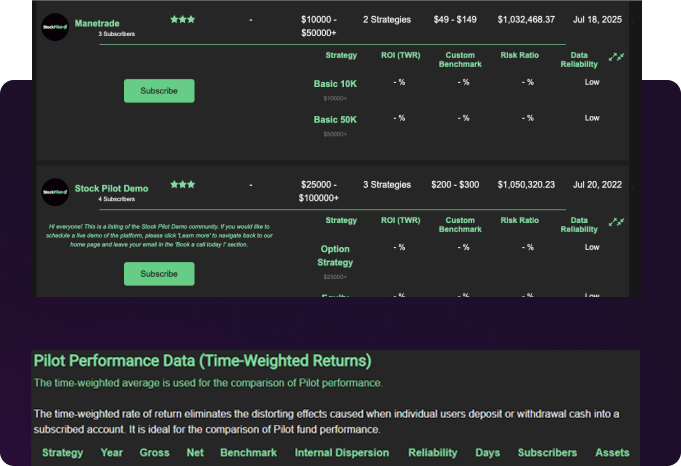
Strategies & Performance

Subscribe to alternative investments with confidence by knowing the historical performance and derived performance ranking of available strategies on the platform. These rankings are loosely based on the Global Investment Performance Standards ( GIPS ), used for comparison of investment performance around the world. If the higher level rankings are not enough, you can view the detailed strategy performance by viewing the detailed view, viewing the actual metrics used in comparisons by firms globally.
image

Position Sizing

Subscribers may utilize one of three position sizing features: CopyDirect, AutoScale, or TradeOverride. These features allow position sizing to be based on a direct 1-1 copy from the model account, scaled proportionally to varying account size values to utilize additionally available capital, or to override and use a discrete trading amount in each trade order that is placed, respectively. We think the autoscaling feature is neat.

image
Learn More

Strategy Amounts

Once a Position Sizing function is selected, users may additionally allocate a certain portion of their personal account, depending on the scaling function selected. This may include no strategy amounts for CopyDirect, either one of ‘full account’ or ‘account percentage’ ( e.g. 50% of account dedicated to the strategy ) for the AutoScale feature, or one TradeOverride amount, represented in dollars ( $ )

image
Learn More
image
image

Positions and Orders

Easily view positions and orders placed by the automation in real-time by switching between the positions and orders tab in your alternative strategy portfolio.

image
Learn More

Want to Learn More About Active Options and Futures Trading?

Check out our educational section, where we help new investors learn about how these alternative strategies may compare to what is> typically provided by financial institutions

Download PDF

Notification System

image

Your favorite Discord, Telegram, Twitter, and Facebook communities will automatically be updated of events on the autotraded accounts via AlertBot, and subscribers may also receives notifications directly to their mobile device via the SMS network.

image
image

SMS Confirmation

image

We optionally provide an SMS trade confirmation mechanism, which if enabled, requires the subscriber to approve of each automated trade order, via a unique SMS authorization link that is sent to the subscriber directly via the SMS network. Subscribers may opt out of this confirmation mechanism by toggling the feature to off in the ‘Advanced Settings’ tab found with their strategy automation settings. Please note: Orders staged with the trade confirmation mechanism will have an associated trade expiry that will render the specific order invalid after the configured period of time, so users must be attentive in order to respond to confirmation links

image

Socials

image

Take part in online discussions with connected social communities, allowing you to collaborate and find a new sense of inclusion.

Browse our Strategies and Get Started Today!

Check out our Strategies & Performance page to find an alternative investment best suited for you.

image
image

Get More Updates

Subscribe to SP Newsletter

Join our mailing list to stay in the loop with our newest feature releases, tips and tricks